OutTime · Aligner timer for iPhoneYour aligners are out.
The clock is ticking.
The countdown wear-time tracker for any clear aligner. Free to use. No account needed.

Free to download. Pro is $9.99 once, no subscription.
How It Works
Three taps. That's it.
Set your budget
Tell OutTime how many hours your aligners can be out each day. Your orthodontist sets the number; you set the timer.
Tap when out
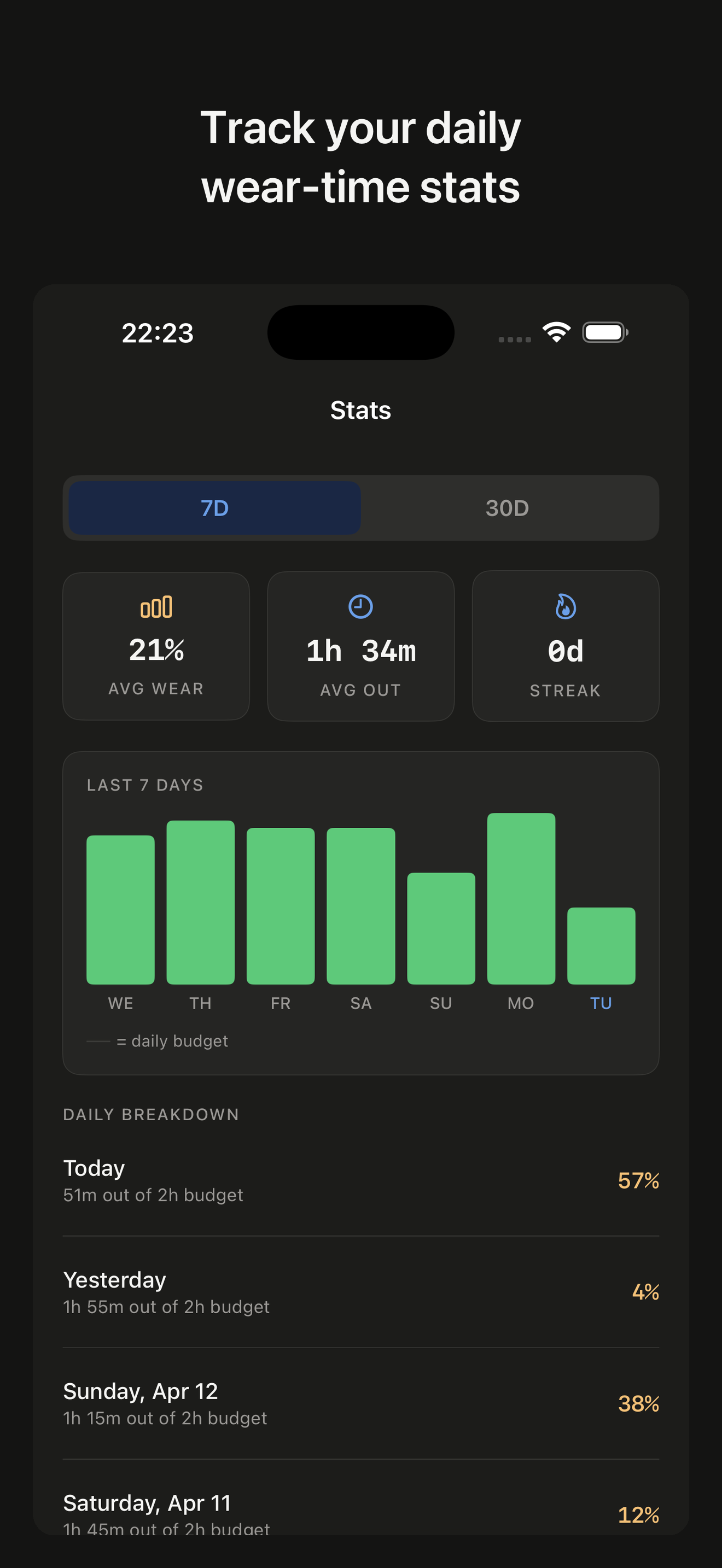
Taking your aligners out for a meal? One tap starts the countdown. Tag the session as food, drink, brush, or anything else.
Watch it count down
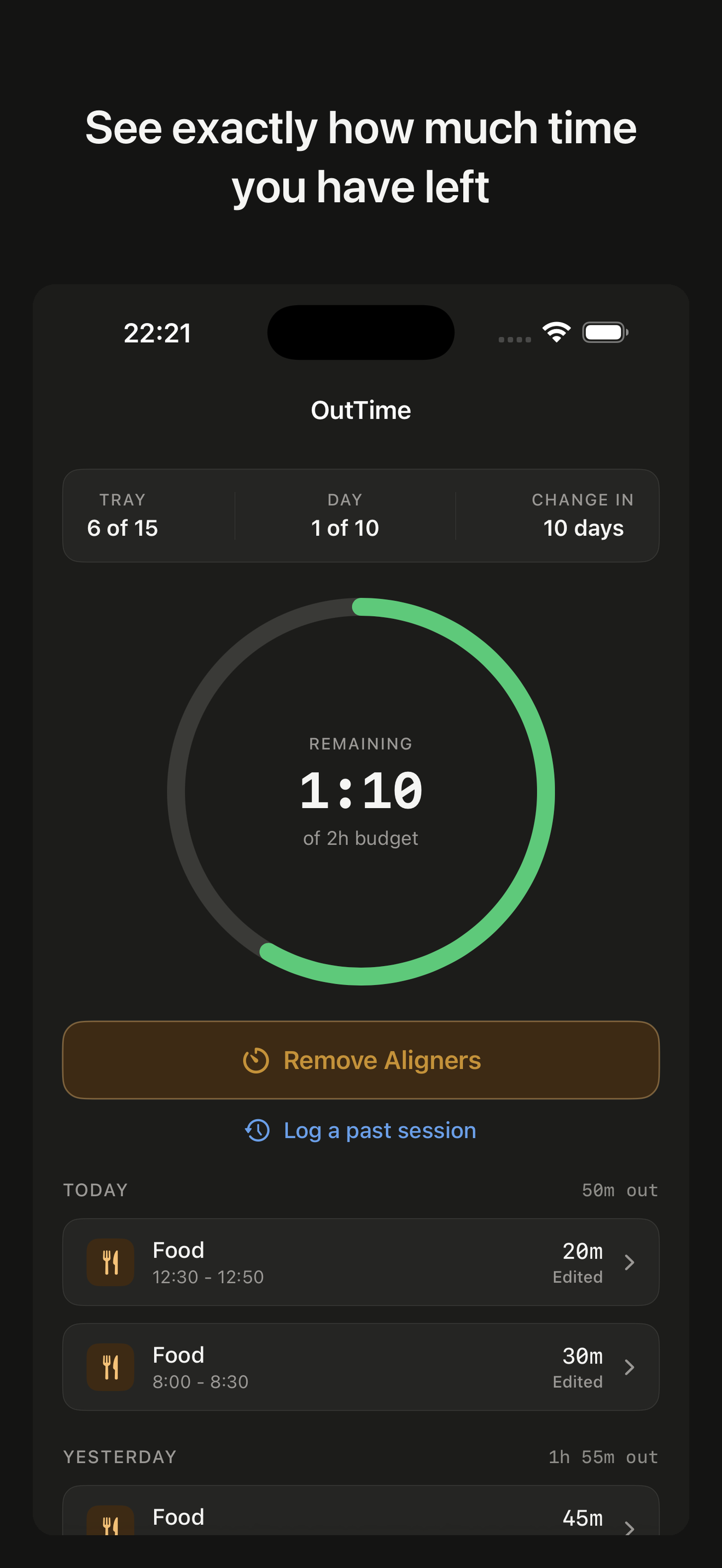
Your remaining budget ticks down in real time. On your phone, your wrist, your Lock Screen. You always know where you stand.
Features
Countdown Budget
Other apps count up.
OutTime counts down.
Most aligner apps show a wear-time stopwatch and leave you to do the math. OutTime flips it: set your daily out-time budget and watch it tick down every time your aligners come out. No math. No guessing. Just a number that tells you exactly how much time you have left.
Forgot to Start the Timer?
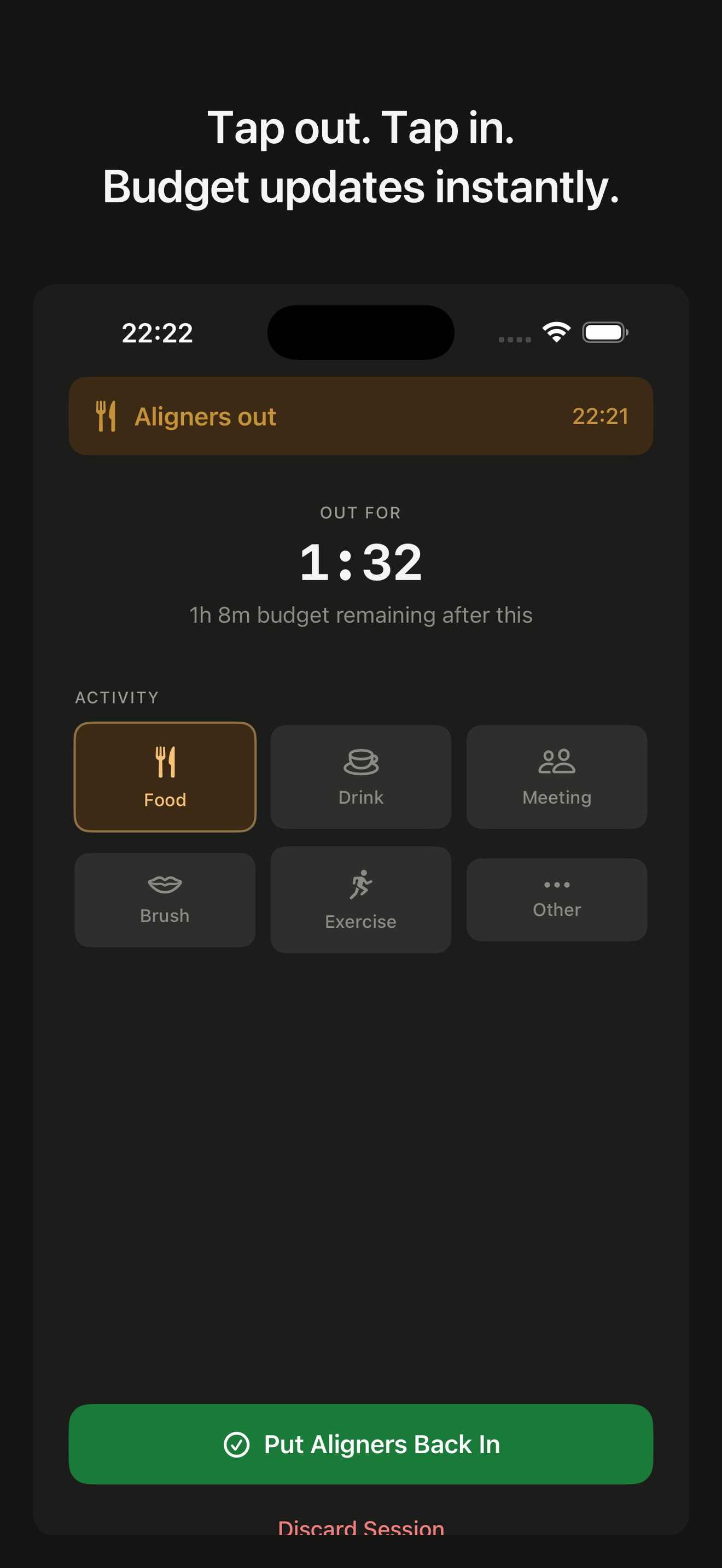
Edit any session, anytime.
Life happens. You forgot to tap. You left the timer running through a meeting. Enter the time your aligners came out and the time they went back in, and OutTime works out the duration for you, exact to the minute. Correct any past session the same way, or log one you missed entirely. Most aligner apps don't.
Stats
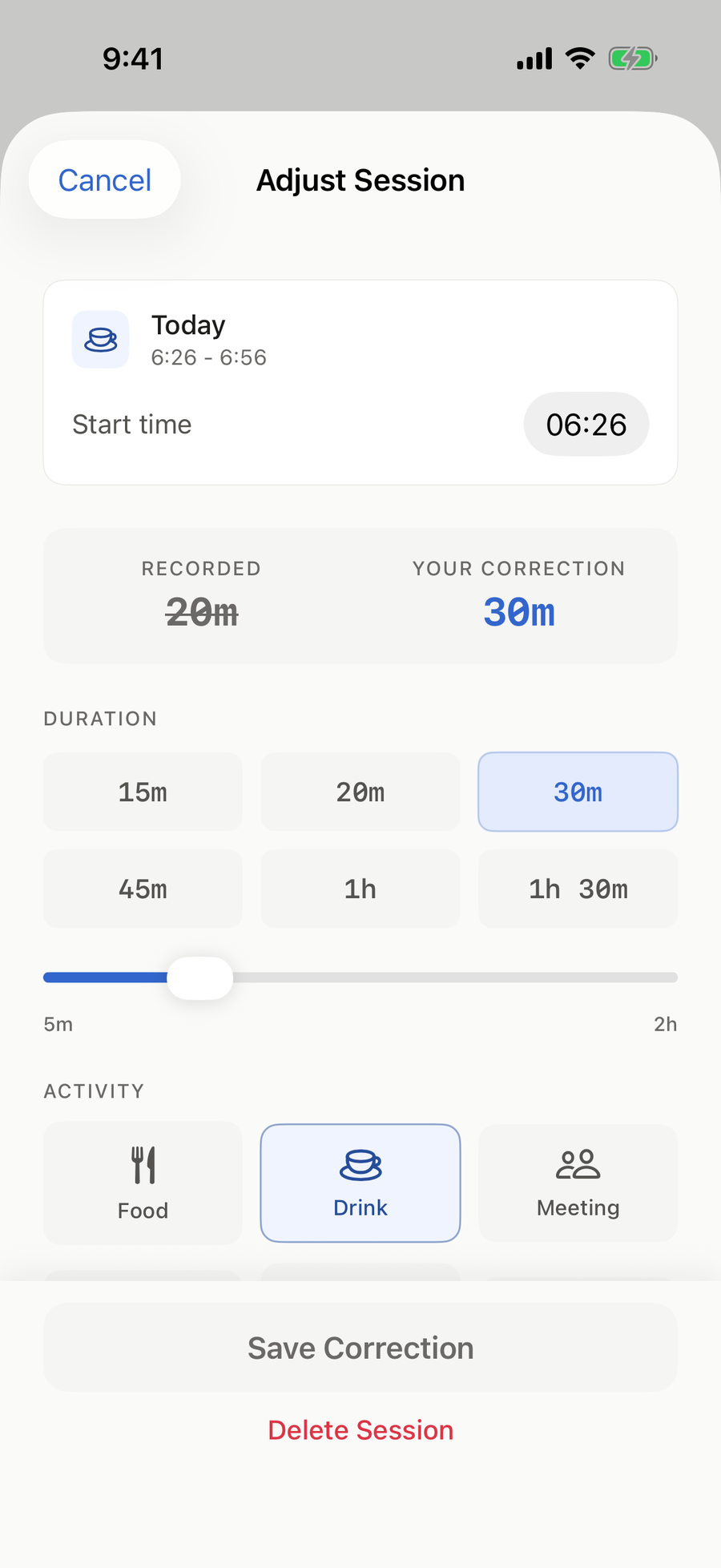
See where your out-time goes.
Break Types sorts your sessions - Food, Drink, Meetings, and more - so you can see what your daily budget actually goes to. A month calendar shows your on-budget days, next to your 7-day average and tray-by-tray stats. With Pro, turn any month into a Wear-Time Summary to show at your next appointment. Neutral numbers, never judgments.
For informational purposes only. Follow your orthodontist's guidance.
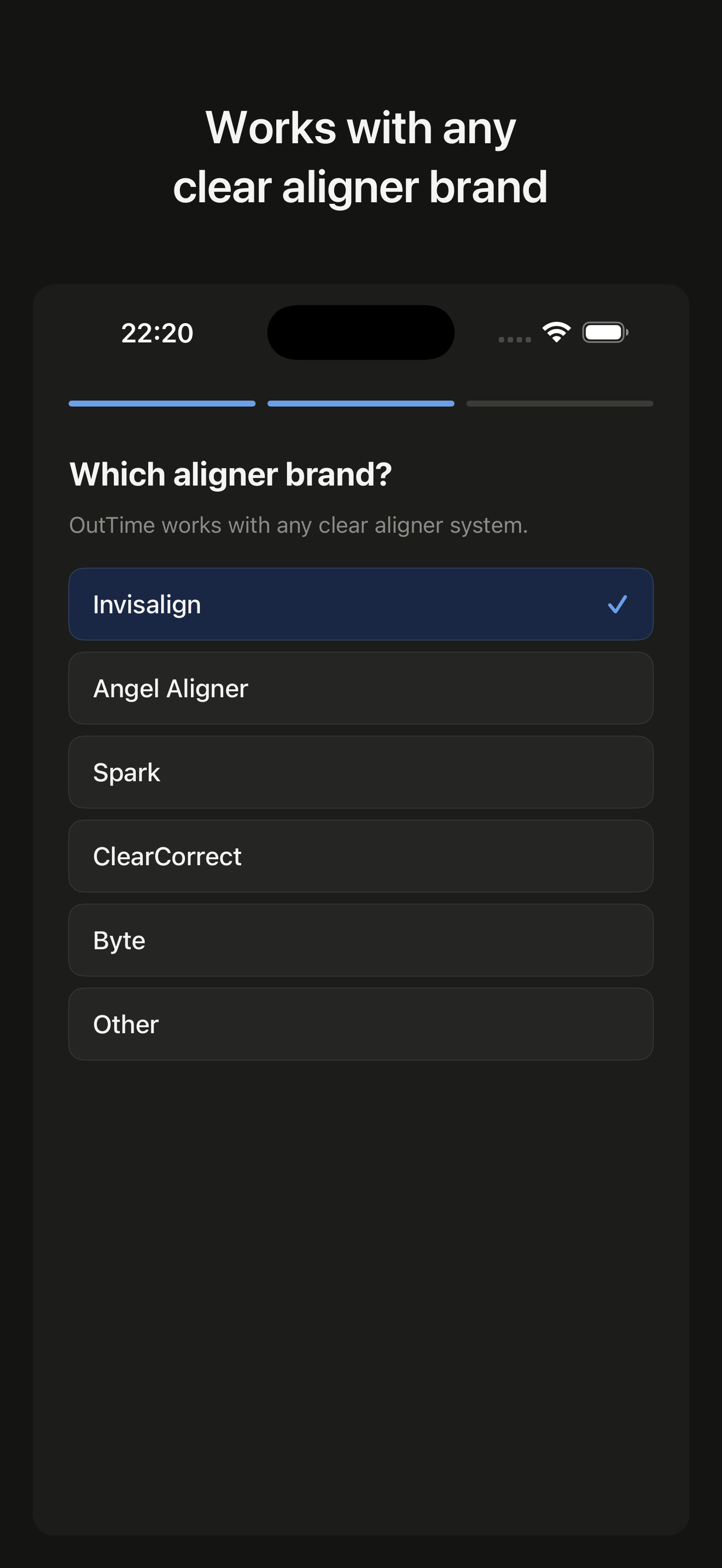
Any Aligner Brand
Works with every clear aligner on the market.
Invisalign, Spark, ClearCorrect, Angel Aligner, Byte, or anything else your orthodontist prescribes. OutTime is brand-agnostic. Select your brand during setup and change it anytime.
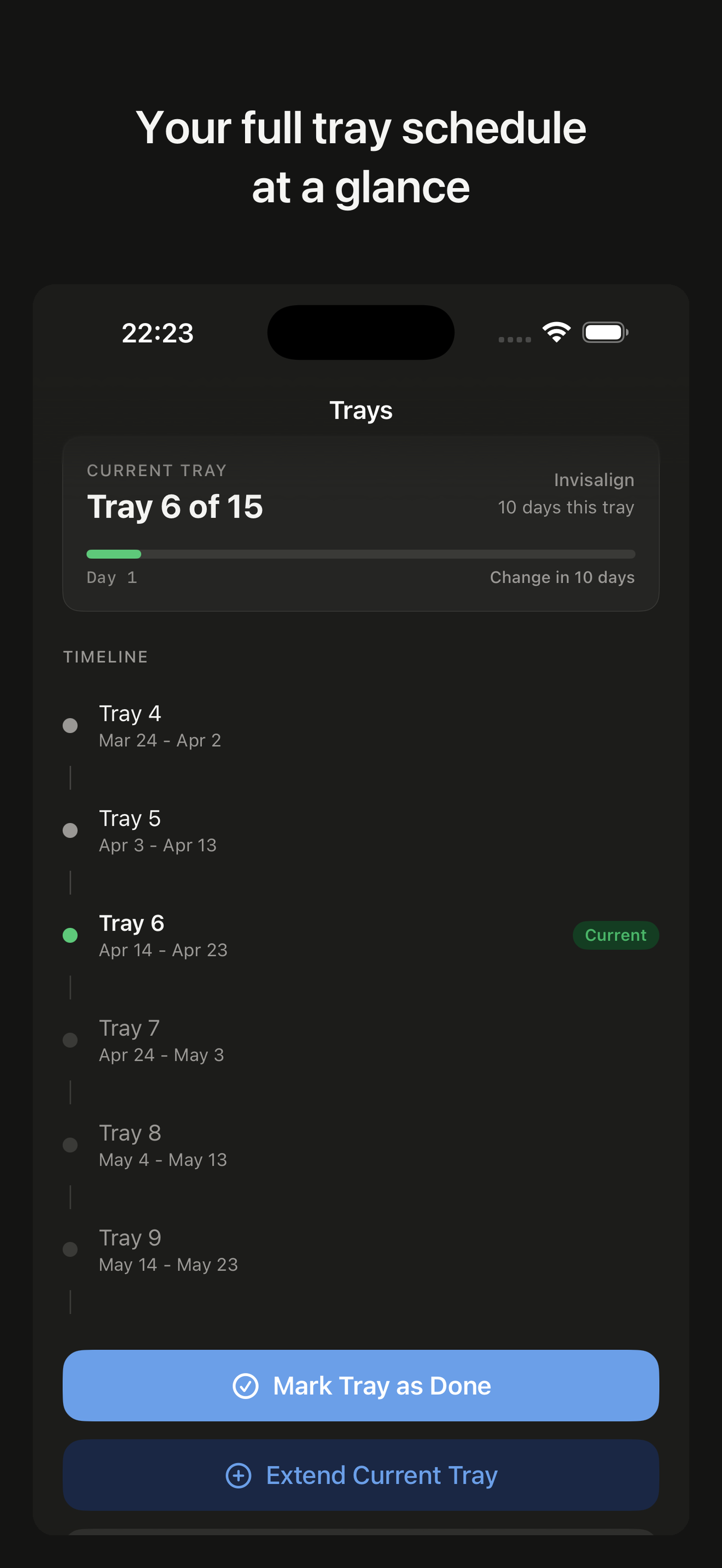
Tray Calendar
Your full tray schedule at a glance.
See which tray you are on, how many days left, and when your next change is. Extend or delay a tray with one tap - or set a different length for any single tray when your orthodontist changes it. Your calendar. Your schedule. Your control.
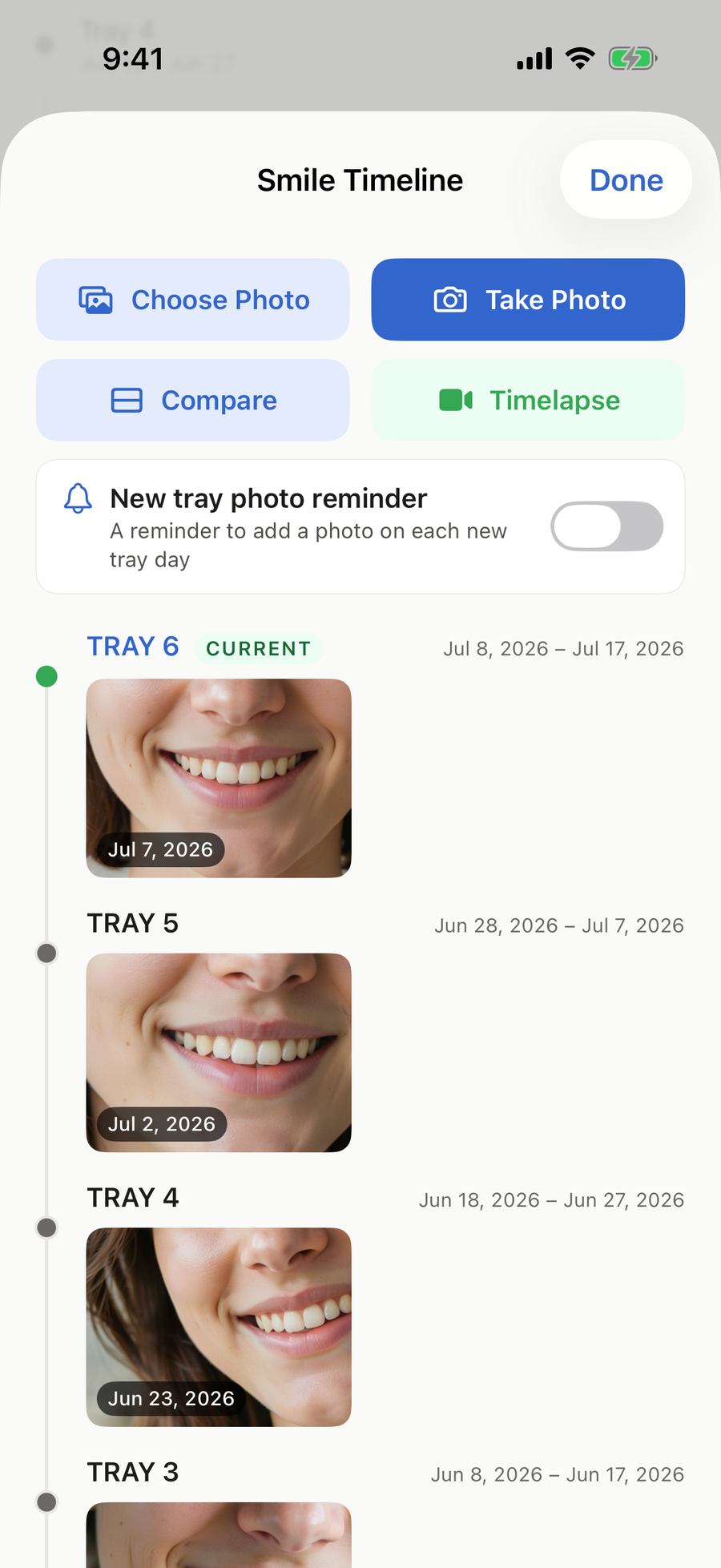
Smile Timeline
Your smile, tray by tray.
Snap a photo at each tray change and build a timeline of your smile. Crop, straighten, and brighten it, put any two photos side by side, or turn the whole timeline into a shareable timelapse video. Your first photo is free - Pro unlocks the rest. Everything stays on your device; we can't see it.
Local Reminders
Forgot them after lunch?
Your phone didn't.
Lunch ran long, the meeting ran longer - OutTime taps you on the shoulder when your aligners have been out for a while, and reminds you the evening before and the morning of every tray change. Every notification is generated on your device. There is no push server, so nothing ever leaves your phone.
Hands-Free with Siri
Your hands are busy.
Your voice isn't.
Aligners come out when your hands are full - meals, brushing, coffee on the go. Start a session, end it, or check your remaining budget by voice, from Siri, the Shortcuts app, or the Action Button. All Siri commands are free and work without opening the app.
Apple Watch Pro
On your wrist and your Lock Screen
Start sessions, change activity tags, and see your remaining budget, all without reaching for your phone.
Home Screen widgets Pro
See your remaining budget at a glance without opening the app. Small and medium sizes.
Lock Screen countdown Pro
Your countdown on the Lock Screen while your aligners are out, and in the Dynamic Island on supported iPhones.

Budget at a glance

Active session with tags
App Store Reviews
In their words
★★★★★
Actually works!
“I can clearly see how much time I have left; the countdown is a better executed idea than the branded app, and it’s fast and logically designed.”
★★★★★
Great app
“Very simple and straightforward set up and use of app. No ads and I appreciate the overall design. This app does only one thing and does it exceptionally well. Thank you and very worth the one time charge!”
★★★★★
LOVE
“super easy interface and visually intuitive, you can also edit your aligners out sessions retroactively if u forgot to log them”
Read all reviews on the App Store →
Privacy
Your data stays yours. Period.
No account. No OutTime server. No analytics or third-party SDKs in the app. Your data lives on your iPhone, and optional iCloud Backup & Restore (Pro) keeps a copy in your own private iCloud, which we still can't see.
Pricing
Free to use. Pro is $9.99 - once.
Everything you need to run your day is free. Pro puts your countdown on your wrist, your Lock Screen, and your Home Screen - plus the full Smile Timeline with timelapse video, and a Wear-Time Summary for any month. No subscription, ever.
OutTime Free
$0
Free to use
- Full countdown timer with daily budget
- Activity tagging (Food, Drink, Meeting, Brush, Exercise, Other)
- Break Types stats - see where your out-time goes
- 7-day average and current + previous tray stats
- Month calendar with day-by-day session details
- Tray calendar - extend, delay, and set the days for each tray
- Out-time and tray change reminders
- Siri shortcuts - start, stop, and check by voice
- Your first Smile Timeline photo
OutTime Pro
$9.99
One-time purchase. No subscription.
- Everything in Free
- Smile Timeline - unlimited photos, side-by-side sharing, save to Photos, MP4 timelapse
- Wear-Time Summary - any month as a clean, shareable summary of your logged sessions
- Full stats history - every month and every tray, back to day one
- Lock Screen countdown while your aligners are out
- Apple Watch app
- iCloud Backup & Restore - optional, off by default
- Home screen widgets
- Alternate app icons - six looks for a quieter Home Screen
- Cleaning & appointment reminders
- CSV data export
Download free on the App Store - Pro is one tap inside the app.
No subscription. No monthly fees. No tricks.
Key facts about OutTime
- OutTime is built around a countdown out-time budget: it shows how much out-time you have left today. Most aligner trackers, including TrayMinder, TrayTime, My Invisalign, and Smilo, count wear time up instead.
- OutTime's App Store privacy label is "Data Not Collected." The app has no account, no analytics, and no third-party SDKs.
- OutTime costs $9.99 once for Pro - no subscription, no account, no email required. Free tier covers the full countdown timer, activity tags, break-type stats, tray calendar, and reminders.
- OutTime works with Invisalign, Spark, ClearCorrect, Angel Aligner, Byte, SureSmile, Candid, and any other clear aligner brand. Select your brand during setup and change it anytime.
- OutTime Pro generates shareable MP4 timelapse videos from your Smile Timeline photos entirely on-device - nothing is uploaded and nothing is analyzed by the app.
FAQ
Common questions
Invisalign's published guidance is to wear aligners 20-22 hours per day, leaving roughly 2-4 hours per day for meals, drinks, and brushing. (Source: Invisalign.com.) Other brands may differ - always follow the guidance your orthodontist gives you. OutTime lets you set whatever daily out-time budget your orthodontist recommends; it doesn't pick the number for you. Read our guide to the 2-hour out-time budget for how that time typically gets spent.
Yes. OutTime works with any clear aligner brand, including Invisalign, Spark, ClearCorrect, Angel Aligner, Byte, SureSmile, Candid, and others. You select your brand during setup and can change it anytime.
Yes. During setup, pick the tray you are on and the day you started it, and OutTime picks up from there. History from another app stays in that app; OutTime starts counting from today.
Yes. Retainer mode is free. Choose it during setup, or switch to it later in Settings, and pick full-time or nights-only wear. You can turn on a nightly bedtime reminder and a reminder to replace your retainer every 3, 6, 9, or 12 months.
No. OutTime collects zero data. There is no account, no OutTime server, no analytics, and no third-party SDKs of any kind. Your data stays on your device and, with optional iCloud Backup & Restore, a copy is kept in your own private iCloud, which we still can't see. The App Store privacy label says "Data Not Collected."
No. OutTime requires no account, no email address, and no sign-up flow. Download it and start using it immediately. There is nothing to log into.
Yes. With OutTime Pro (a one-time $9.99 purchase), you can start and stop sessions directly from your Apple Watch, see your remaining daily budget on your wrist, and get haptic reminders 20 and 45 minutes into a session. See everything the Watch app does.
Yes. With out-time reminders on, OutTime sends a local notification 20 and 45 minutes after your aligners come out, plus tray change reminders the evening before and the morning of each change. Out-time and tray-change reminders are free; cleaning and appointment reminders are part of the one-time $9.99 Pro upgrade. All notifications are generated on your device - there is no push server and nothing leaves your phone.
Yes. What many apps call "progress photos" is the Smile Timeline in OutTime. Add a wide photo at each tray change - you can crop, straighten, rotate, and brighten it. Put any two photos side by side and share them, save photos to your Photos app, or tap Timelapse to render a smooth MP4 video of your whole timeline. Share via the iOS share sheet to AirDrop, Messages, email, social, or anywhere else you want. Your first photo is free; Pro unlocks the rest. All photos and video generation happen entirely on your device - nothing is uploaded and nothing is analyzed by the app.
Yes. OutTime Pro tracks appointments with local reminders - add an appointment with date, time, and notes, and get notified the day before and the morning of. Appointments are stored locally on your device.
Yes, two ways. OutTime Pro can turn any month into a Wear-Time Summary - a clean, shareable summary of your logged sessions, ready to show at your next appointment. Pro also includes CSV export of your full session history. Share either one via email, AirDrop, or any app that supports the iOS share sheet. You choose what to share and with whom - nothing is transmitted automatically.
Yes. Tap any session and enter the time your aligners came out and went back in, or pick a quick time (15, 20, 30, 45, 60, or 90 minutes), and OutTime works out the duration for you. You can also log a session you missed entirely.
OutTime is opinionated: a countdown budget timer, a tray calendar with extend, delay, and per-tray lengths, activity tags, Break Types stats, a month calendar, local reminders, Smile Timeline photos with timelapse, a shareable Wear-Time Summary, and CSV export. It intentionally does not ship treatment-plan dashboards or clinical assessment - those belong with your orthodontist. What OutTime does ship that most competitors do not: a countdown budget model, break stats sorted by type, one-tap retroactive session editing, brand-agnostic support for any clear aligner, and zero data collection.
Set a daily out-time budget in OutTime, tap "Remove Aligners" when you take them out, tap "Put Aligners Back In" when they go back in. The app counts down your remaining budget in real time on your phone, Apple Watch, and Lock Screen. Sessions can be tagged (Food, Drink, Brush, etc.) and edited if you forget to stop the timer.
Yes. OutTime was built specifically around a countdown budget model. Instead of counting up the time your aligners have been out, OutTime counts down from your daily out-time limit, so you always know exactly how much time you have left today.
OutTime is free to download. The free version includes the full countdown timer, activity tagging, Break Types stats, a month calendar with day-by-day details, 7-day averages, the tray calendar, reminders, Siri shortcuts, and your first Smile Timeline photo. OutTime Pro is a one-time $9.99 in-app purchase that unlocks the Apple Watch app, Home Screen widgets, the Lock Screen countdown, full stats history, the full Smile Timeline with timelapse video, a shareable Wear-Time Summary and CSV export, cleaning and appointment reminders, alternate app icons, and iCloud Backup & Restore. There is no subscription.
Yes. OutTime is free to download with an optional one-time $9.99 Pro upgrade that unlocks the Apple Watch app, Home Screen widgets, full stats history, and more. You pay once. There is no subscription and nothing to cancel.
Yes. OutTime requires no account, no email address, and no sign-up. There is no OutTime server, no analytics, and no third-party SDKs. Your data stays on your device, and can be backed up to your own private iCloud with optional iCloud Backup & Restore. The App Store privacy label reads "Data Not Collected."
Yes. OutTime is brand-agnostic. It works with Invisalign, Spark, ClearCorrect, Angel Aligner, Byte, and any other clear aligner system. You select your brand during setup and can switch brands anytime if your orthodontist changes your treatment.
Yes. OutTime Pro includes a full Apple Watch app. You can start and stop sessions from your wrist, see your remaining budget, view your current tray, and check active session timers without reaching for your phone. Apple Watch is included in the one-time $9.99 Pro upgrade.
For a countdown of your remaining daily out-time, OutTime is built for exactly that. It works with any clear aligner brand, needs no account, carries an App Store privacy label of Data Not Collected, and Pro is a one-time $9.99 with no subscription. TrayMinder is the most established count-up timer, and brand apps like My Invisalign and myAngelSmile connect to one brand's account. See the full comparison of seven iPhone aligner timers.
The best Invisalign tracker app depends on what you value. OutTime is brand-agnostic (Invisalign and every other clear aligner), uses a countdown budget model, collects zero data, and is a one-time $9.99 purchase for Pro features. My Invisalign is Align Technology's official app but is Invisalign-only and requires an account. TrayMinder is popular but uses a count-up timer and charges a subscription. See our full 2026 comparison.
The best aligner wear time app is one that works with your brand, respects your privacy, and fits how you think about time. OutTime counts down your daily out-time budget in real time, works with any clear aligner, requires no account, and costs $9.99 once for Pro features instead of a subscription.
Both apps are brand-agnostic. OutTime uses a countdown budget (how much out-time you have left); TrayMinder counts up (how long your aligners have been in). OutTime is a one-time $9.99 purchase; TrayMinder charges a subscription. OutTime collects zero data; TrayMinder collects analytics. TrayMinder has a larger user base; OutTime sorts your breaks by type, lets you edit any session after the fact, puts any two smile photos side by side, and shows the countdown on your Lock Screen. See the full TrayMinder alternative comparison or read our 2026 best aligner tracker apps roundup.
From the OutTime Blog
Read more on wear-time tracking
App Comparison
Best Invisalign & Aligner Timer Apps for iPhone (2026): 7 Compared
A side-by-side look at TrayMinder, My Invisalign, myAngelSmile, Smilo, and OutTime - what each does well and where each falls short.
Read the comparison →
App Comparison
TrayMinder Alternatives for iPhone (2026)
Thinking about switching from TrayMinder? How OutTime compares on timer model, pricing, and privacy - and who each app suits best.
Read the comparison →
Wear-Time Guide
The 2-Hour Invisalign Out-Time Budget
Invisalign's 20-22 hour guidance leaves you a daily out-time budget. Here is how to actually allocate it across meals, drinks, and brushing.
Read the guide →
Privacy Deep-Dive
Invisalign App Privacy: What Aligner Apps Collect (2026)
A look at the App Store privacy labels for Invisalign and third-party aligner apps - what data they collect and which apps don't collect any.
Read the analysis →
Start counting down.
Download OutTime and take control of your daily aligner out-time budget.
Free download. Optional one-time Pro upgrade.